
Cortex XSIAM Charges for Your Third-Party Data. Make Every Gigabyte Count.
If you run Cortex XSIAM, you already know the pricing works a little differently from other SIEMs. Your PaloAlto gear (NGFWs, Prisma Access, Cortex agents) comes in through native paths built for the platform. What shows up on the bill is everything else. Fortinet and Cisco boxes. Your identity provider. SaaS apps, Linux hosts, and that long tail of syslog sources nobody has fully inventoried.
So the question I end up asking XSIAM teams isn't the usual "how do we send less." It's closer to this: is the third-party data you're paying for doing anything once it lands? In a lot of environments, a fair amount of data is not being used once it lands, most of the time it's only collected for compliance reasons.
Two Kinds of Data, Two Different Bills
XSIAM is sold as a platform. The tiers include an Analytics ingest allowance measured in GB per day, and you can add retention, a cheaper data lake tier, and more compute on top. When you look at where the data comes from, it splits roughly like this:
- Data: Palo Alto NGFW, Prisma Access, Panorama; How it reaches XSIAM: Native integration; What it costs: Covered by the platform deal
- Data: Cortex XDR agents on endpoints and servers; How it reaches XSIAM: Native agent; What it costs: Licensed per endpoint
- Data: Third-party firewalls, network gear, identity, SaaS, Linux, hypervisors; How it reaches XSIAM: HTTP log collector, syslog, Broker VM; What it costs: Counts against your GB/day ingest
- Data: Anything you keep past standard retention; How it reaches XSIAM: Retention or data lake add-on; What it costs: Billed on top
Because retention is billed on top, plenty of XSIAM shops keep a second system around just for long-term storage and forensic search. Some do it even for their Palo Alto data.
Still, the third-party row is where most of the money goes, and it's also where XSIAM has the hardest time.
The Hidden Cost: Paying for Logs XSIAM Can't Read
XSIAM's analytics and AI-driven detections run on data that's been mapped into XDM, its data model. Palo Alto data shows up already mapped. Third-party data only gets there if XSIAM knows exactly what it's looking at, and that comes down to a few details that are easy to get wrong.
The first is labeling. XSIAM picks a dataset for each event based on its vendor and product fields, and if those are missing or wrong, the event lands as "unknown vendor, unknown product." ESXi logs labeled as generic Linux are a common example. They're in XSIAM, you're paying for them, and they're sitting in the wrong dataset.
Spelling matters more than you'd expect, too. The ESXi parser wants the product name written a specific way, capital letters included, and close doesn't count.
Then there's format. I've seen identity provider logs that mixed RFC 5424 syslog with LEEF get rejected as malformed key-value pairs until someone cleaned up the format. And a Marketplace parser that only pulls out the timestamp leaves you with something you can search, but nothing a detection can use.
When any of that goes wrong, you still pay for the gigabytes. You just don't get detections out of them. Custom-parsed sources can sit in XSIAM for months without a single AI-driven alert firing, until somebody pulls the data back out and resends it in a form XSIAM recognizes. Volume matters, sure, but paying for data that does nothing is the bigger leak.
How Axoflow Makes Third-Party Data Earn Its Place
We leave Palo Alto's native data alone. The work happens on the data you're paying for.
AxoRouter looks at each message and identifies the source from its content, not the port it came in on. It then sets the vendor and product labels XSIAM expects, so new sources show up in AxoConsole already identified. Mixed or malformed messages get cleaned into one consistent format before they reach the HTTP/S log collector, and if you want, the data can be normalized to XDM in the pipeline so XSIAM can use it the moment it arrives.
Once the data is parsed, reduction gets a lot safer. You can drop empty fields, duplicate timestamps, and low-value events while keeping what your detections rely on. I'd plan on 25 to 40% from noise alone. Make sure every drop rule has a reason you can say out loud, and if a reduction number looks too good to be true, check whether you're throwing away events you'll want later.
From there, it's about sending each event where it's worth the most. Detection-relevant events go to XSIAM. Bulk, compliance, and forensic data goes to AxoLake, which stores it as indexed Parquet at roughly 8 to 10x compression and keeps it searchable for years, so you're not paying for XSIAM retention add-ons. The same source can also feed a second platform in its own format, like raw syslog to XSIAM and CEF to Graylog. Axoflow is priced on what comes in, not on how many places it goes, so that second copy doesn't double your pipeline bill.
The last piece is knowing when something breaks. If a source goes quiet, or a firmware update changes its log format, AxoConsole flags it before your detections stop working without anyone noticing.
How It Fits Together
Palo Alto data and the third-party data you pay for take different paths, and only one of them needs any work.
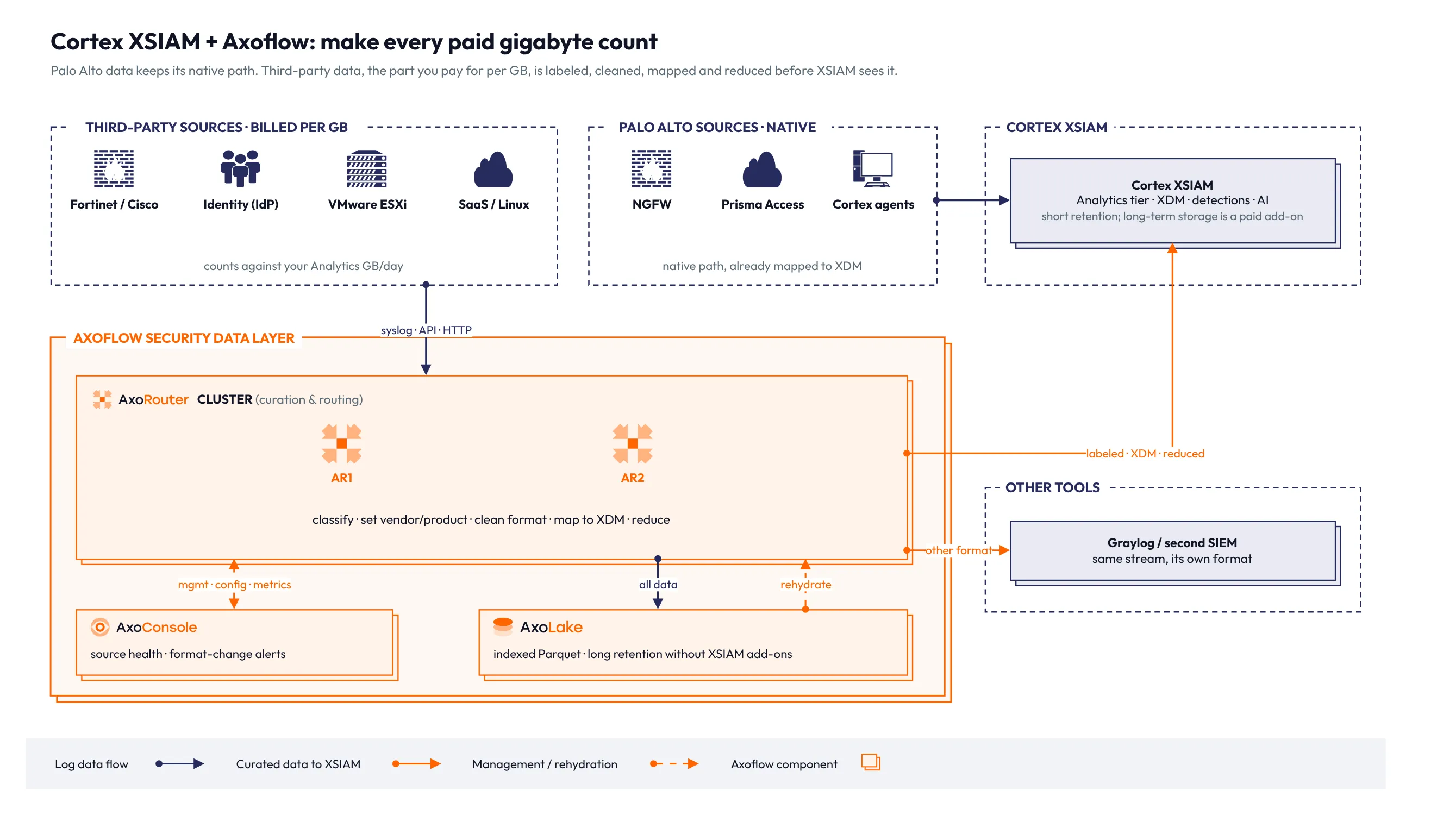
Native Palo Alto data goes straight into XSIAM. Third-party data runs through AxoRouter first, which labels and cleans it, sends the curated stream to XSIAM, keeps a full copy in AxoLake, and can feed a second tool in whatever format that tool wants.
Best Practices for Third-Party Data in Cortex XSIAM
If I sat down with an XSIAM team for an afternoon, this is the list I'd work through with them:
- Inventory what you actually pay for. List every source that counts against your GB/day allowance. For most teams, that's everything except Palo Alto's own products and the Cortex agents.
- Leave native data on its native path. Palo Alto firewall and Cortex agent data already arrives mapped, so don't push it through a pipeline just because you can.
- Search XSIAM for unknown-vendor and unknown-product events. Every one of them is data you're paying for that isn't landing in the right dataset.
- Check that each paid source feeds a detection. If one never maps to XDM or never triggers an analytic, fix how it arrives or stop sending it.
- Ask for the reason behind every drop rule. The real savings come from cutting noise, not from dropping events you'll need in an investigation.
- Size your Analytics tier on the cleaned volume. Measure third-party ingest after reduction across a full weekday, then license against that number.
- Keep long-term retention in storage you control, and rehydrate into XSIAM when an investigation calls for it.
Axoflow pricing is flat tiers by average GB per day, fixed for the contract term, with no charge per AxoRouter, agent, or destination. Your Palo Alto data is probably already in good shape. The goal is to get the data you're paying for there too.
Request a demo and we'll show you what your third-party sources look like before and after.

Follow Our Progress!
We are excited to be realizing our vision above with a full Axoflow product suite.
Sign Me UpFighting data Loss?

Book a free 30-min consultation with syslog-ng creator Balázs Scheidler